How to make smart devices at home without coding
Building a home of the future used to be a hobby reserved for software engineers and tech wizards. You’d imagine someone hunched over a circuit board, typing cryptic lines of C++ just to get a lightbulb to blink.
If that image has kept you from upgrading your living space, I have good news: the era of DIY coding is over.
In 2026, the barrier to entry has completely vanished. You don’t need to know what a “Boolean” is to make your coffee start brewing the moment your feet hit the floor. This guide will show you exactly how to make smart devices at home without coding, using affordable, off-the-shelf tools that do the heavy lifting for you.
Why No-Code Smart Devices Work
The smart home industry has shifted from “open-source hacking” to “consumer-ready ecosystems.” Here is why building your smart home without code is actually the superior choice for most beginners:
- Simplicity: Most modern devices use “If This, Then That” logic. If a sensor detects motion, then the light turns on. It’s plain English, not Python.
- Affordability: You no longer need expensive custom controllers. A $10 smart plug can turn a 20-year-old “dumb” lamp into a voice-controlled masterpiece.
- Plug-and-Play Systems: Manufacturers now use standardized protocols (like Matter and Thread) that allow different brands to talk to each other instantly.
- Safety: When you don’t mess with raw code or exposed wiring, you eliminate the risk of “bricking” your devices or causing electrical shorts.
The Essential Toolkit: No Programming Required
Before we dive into the “how-to,” let’s look at the tools that make this possible. Think of these as your building blocks.
1. The Brain (Smart Hubs)
You need a central place to manage your devices. You likely already own one:
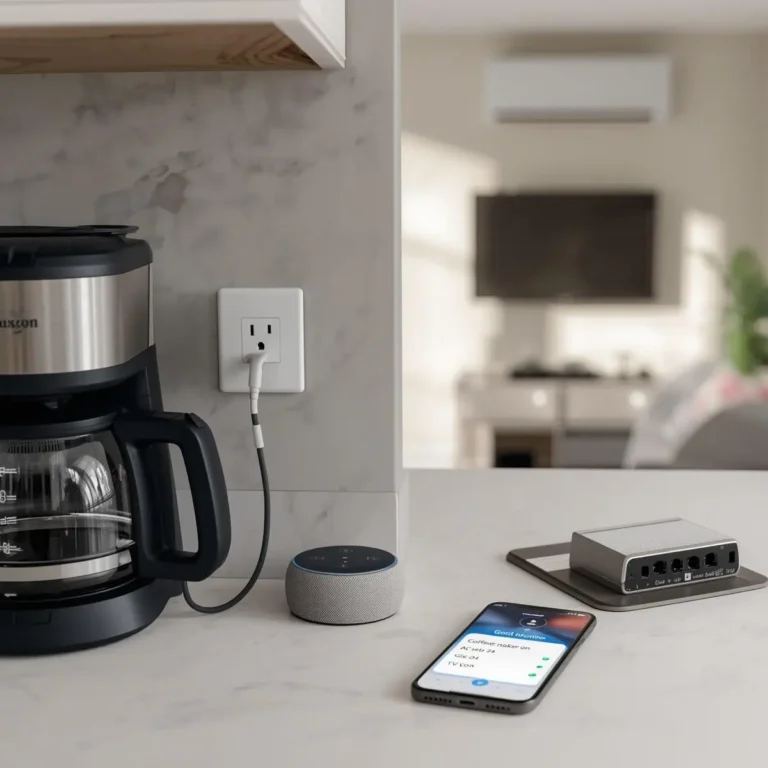
- Amazon Alexa / Google Home: These aren’t just speakers; they are the command centers for your no-code automations.
- Apple HomePod: Perfect if you are already deep in the iOS ecosystem.
2. The Translator (Smart Plugs)
If you want to know how to make smart devices at home without coding, start with the smart plug. It acts as a bridge between a regular outlet and any appliance. If it has a physical “on” switch, a smart plug can make it “smart.”
3. The Glue (Automation Apps)
- IFTTT (If This Then That): A web-based service that connects different apps and devices.
- Manufacturer Apps: Brands like Kasa, Govee, or Philips Hue have built-in “Lab” features that allow for complex routines with a single tap.
Step by Step: How to Make Your First No Code Smart Device
Let’s walk through a practical project: Creating a “Welcome Home” sequence that turns on your lights and a fan when you arrive, without touching a single line of code.
Step 1: Choose Your Hardware
For this project, you’ll need:
- A Smart Plug (e.g., TP-Link Kasa).
- A Smart Bulb (e.g., Wyze or Govee).
- A Smartphone.
Step 2: Connect to the App
Plug your device into the wall. Open the manufacturer’s app (e.g., the Kasa app) and follow the on-screen instructions. Usually, this involves:
- Pressing a button on the device until it blinks.
- Selecting your home Wi-Fi network.
- Naming the device (e.g., “Living Room Fan”).
Step 3: Create the Routine (The No Code Logic)
This is where the “making” happens. Instead of coding, you will use Routines.
- Open the Amazon Alexa or Google Home app.
- Go to Routines and tap the + icon.
- When this happens: Select “Location” -> “Arrive at Home.”
- Add action: Select “Smart Home” -> “Living Room Fan” -> “On.”
- Add another action: Select “Smart Home” -> “Entryway Light” -> “On.”
Step 4: Test Your System
Walk out of your geofence (usually 100 yards from your house) and walk back in. If the light pops on, congratulations! You just “programmed” a smart home sequence without a keyboard.
3 Creative Ideas for No-Code Smart Devices
Wondering what else you can do? Here are three beginner-friendly projects that feel like magic but require zero technical skill.
1. The Anti-Snooze Morning Machine
- The Device: A smart plug connected to a loud radio or a bright lamp across the room.
- The Logic: Set a schedule in the app for 7:00 AM.
- Why it works: It forces you out of bed to manually turn off the device, and because it’s integrated into your app, you can’t just “snooze” it easily.
2. The Automatic Night-Light
- The Device: A motion sensor and a smart bulb in the hallway.
- The Logic: “If motion is detected between 11 PM and 6 AM, turn bulb on to 10% brightness.”
- The Result: No more stubbed toes during midnight snack runs.
3. The “Is the Oven On?” Safety Monitor
- The Device: A smart indoor camera pointed at your stove.
- The Logic: No logic needed just remote viewing.
- The Result: Peace of mind while you’re at work.
Common Mistakes Beginners Make
Even when you learn how to make smart devices at home without coding, you might run into a few speed bumps. Avoid these:
- Buying Incompatible Ecosystems: Ensure your devices say “Compatible with Alexa/Google/HomeKit” on the box. If you buy a Zigbee sensor but don’t have a Zigbee hub, it won’t work.
- Weak Wi-Fi: Smart devices live and die by your internet. If a device is “not responding,” it’s likely too far from your router.
- Over-complicating Routines: Start with one trigger and one action. Don’t try to make 15 things happen at once until you’re comfortable with the app interface.
- Ignoring the Physical Switch: If you turn off a smart bulb using a wall switch, the “smart” part loses power. You must leave the physical switch ON for the app to work.
Pro Tips for the Budget Specialist
- Start Small: Don’t buy a $300 smart lock on day one. Start with a $20 multi-pack of smart bulbs to understand the logic.
- Stay in the Family: To keep things simple, try to buy the same brand of plugs and bulbs (e.g., all Kasa or all Govee). This means you only need one app to manage everything.
- Use Virtual Switches: Some apps allow you to create a button on your phone screen that triggers five different devices at once. This is the ultimate no code dashboard.
FAQs:
Can I build a smart home without coding?
Absolutely. 95% of modern smart home users never touch a line of code. Brands like Amazon, Google, and Samsung have designed their interfaces specifically for non-technical users.
Do I need high-speed internet?
You don’t need NASA-level speeds, but you do need a stable connection. Each smart device uses a tiny amount of bandwidth, but having 30+ devices can clutter a cheap, old router.
Is it expensive to start?
No. You can start learning how to make smart devices at home without coding for under $20. A single smart plug is often all you need to realize the potential of home automation.
Does it work if the internet goes out?
Most no-code setups rely on the Cloud. If your internet goes down, your phone might not be able to talk to the plug. However, newer Matter-compatible devices can work locally over your Wi-Fi even if the outside internet is down.
Your Smart Home Starts Today
Learning how to make smart devices at home without coding isn’t about mastering technology; it’s about mastering your environment. By using smart plugs, intuitive apps, and simple routines, you can reclaim your time and add a layer of modern comfort to your life.
Don’t wait for a tech expert to do it for you. Pick up a basic smart plug this weekend, download an app, and set your first automation. Once you see that lamp turn on by itself, you’ll be hooked.